
Picture this: It’s Monday morning. Your HR team is scrambling to print 50 new employee badges before the 9 AM induction. The design software crashes, the ribbon jams, and someone asks — “Why didn’t we just get a better machine?”
Sound familiar? Yeah, I thought so.
Whether you’re running a mid-sized corporate office in Gurugram, managing a school in Pune, or operating a manufacturing unit in an SEZ, an ID card printing machine is one of those things you don’t think about — until you desperately need one. And then it’s all you think about.
This guide is your one-stop answer to everything: what these machines actually do, how they work, which one suits your budget, and how to keep it running without drama.
Let’s get into it.
🖨️ What Exactly Is an ID Card Printing Machine?
An ID card printing machine (also called a PVC card printing machine or badge printing machine) is a specialized device that prints high-quality images, text, barcodes, and photos directly onto plastic cards — typically the same size as a standard credit card (85.6 × 54 mm).
These aren’t your regular inkjet printers. They use dye-sublimation or retransfer technology to produce crisp, professional cards that look and feel legit. From employee IDs and student cards to access control badges and visitor passes — this machine handles it all.
Quick Fact: India’s corporate sector, educational institutions, and healthcare industry together account for millions of ID card prints every year. The demand is only growing.
⚙️ How Does an ID Card Printing Machine Work?
Here’s where it gets interesting.
Most ID card printers use a ribbon-based dye-sublimation process. Think of it like this: the ribbon has panels of color (typically YMCKO — Yellow, Magenta, Cyan, Black, and Overlay). A thermal print head heats the ribbon, which causes the dye to transfer onto the PVC card in incredibly precise layers.
The result? A photo-quality print that’s embedded into the card surface — not just sitting on top of it.
The basic process looks like this:
- You design the card using compatible software
- The machine feeds a blank PVC card from the hopper
- The print head runs across the ribbon, transferring color layer by layer
- A clear overlay (the “O” in YMCKO) seals and protects the print
- Out pops your finished ID card — ready in seconds
Some machines also support encoding — programming smart chips or magnetic stripes for access control systems. More on that shortly.
🔄 Direct-to-Card vs. Retransfer Printing — What’s the Difference?
This is the question I get asked most. And it’s a fair one because it directly affects which machine you should buy.
| Feature | Direct-to-Card (DTC) | Retransfer Printing |
|---|---|---|
| How it works | Prints directly on the card surface | Prints on a film first, then fuses to card |
| Print quality | Good | Excellent (edge-to-edge) |
| Card compatibility | Standard PVC only | Works with smart cards, contactless cards |
| Durability | Standard | Superior |
| Cost | More affordable | Higher upfront cost |
| Best for | Offices, schools, basic IDs | Secure badges, government IDs, hospitals |
Bottom line: If you’re printing basic employee or student IDs, a direct-to-card printer like the Badgy100 or IDP SMART-21S will do just fine. But if you need premium quality — say, for a hospital or an MNC with access-control requirements — look at retransfer models like the HID FARGO HDP5000e.
🃏 What Cards Are Compatible with These Machines?
Not all cards are created equal. Here’s what you need to know before you stock up:
- Standard PVC cards — The most common type. Works with almost every ID card printer.
- Composite PVC cards — More flexible and durable. Preferred for retransfer printing.
- Smart cards (ISO 7816) — Embedded with a microchip for access control or data storage.
- Contactless (RFID) cards — Used in door access systems, attendance tracking.
- Magnetic stripe cards — Older technology, still used in some industries.
Most office ID card printing machines and employee ID card printing machines in India work with standard 0.76mm PVC cards. Always check the machine’s spec sheet before ordering your card stock.
💰 How Much Does an ID Card Printing Machine Cost in India?
Let’s talk numbers — because budget matters.
The ID card printing machine price in India varies quite a bit depending on features, brand, and whether it’s single or dual-sided. Here’s a rough breakdown:
| Category | Price Range (INR approx.) | Best For |
|---|---|---|
| Entry-level | ₹38,000 – ₹60,000 | Small offices, schools, startups |
| Mid-range | ₹70,000 – ₹1,50,000 | Medium businesses, colleges, hospitals |
| Professional | ₹1,50,000 – ₹3,00,000 | MNCs, SEZ units, large institutions |
| Enterprise | ₹3,00,000+ | Government, high-volume card issuance |
Note: Prices vary based on dealer, bundle (software + ribbon included?), and import duties. Always compare at least 2–3 vendors before purchasing.
🏆 Top 10 ID Card Printing Machines — Recommended for India
Here are the most trusted models in the market right now. I’ve broken them down so you can actually make sense of what you’re looking at:
1. IDP SMART-21S — Best Entry-Level Pick
A solid starter machine for low-volume office badge printing. Simple setup, reliable output. Great if you’re printing under 500 cards per month. Approx. Price: ₹60,000 – ₹75,000
2. Badgy100 (Evolis) — Best Budget Option
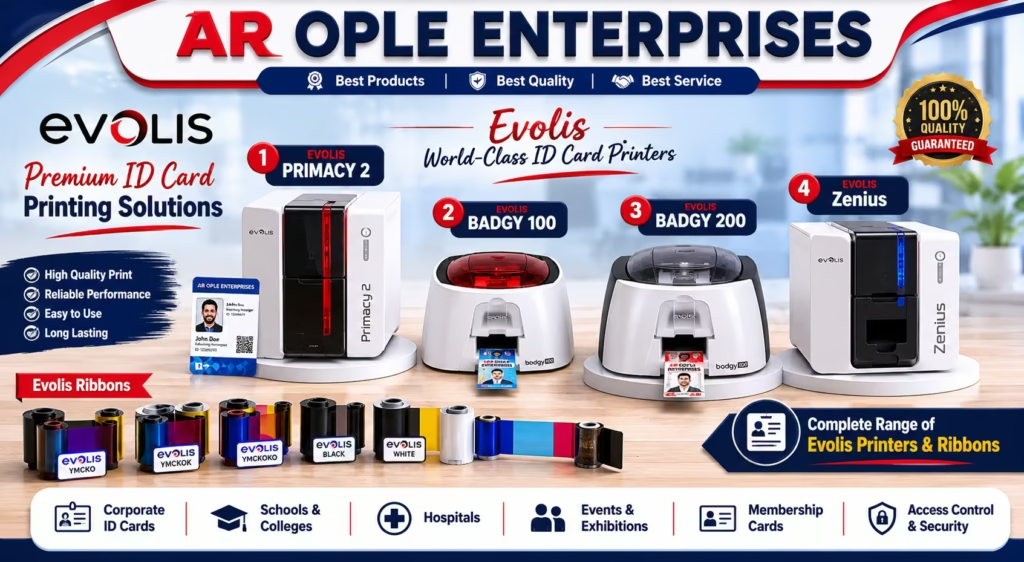
Compact, lightweight, and surprisingly capable. Perfect for small businesses or schools that need basic ID card printing without burning a hole in the budget. Approx. Price: ₹38,000 – ₹50,000
3. IDP SMART-31 — Best Step-Up for Growing Businesses
Faster output, better build quality. A smart upgrade when your volume starts creeping up. Approx. Price: ₹75,000 – ₹1,20,000
4. Zebra ZC300 — Best for Corporate Offices
Zebra is a trusted name in the enterprise space. The ZC300 is reliable, durable, and plays nicely with access-control ecosystems. Approx. Price: ₹75,000 – ₹1,50,000
5. Evolis Primacy 2 — Best for Departmental Badge Programs
Fast, professional, and loaded with features. This one’s a workhorse for larger offices or hospitals that print high volumes regularly. Approx. Price: ₹55800 – ₹2,10,000
6. Magicard 300 — Best for Security-Conscious Buyers
Built-in holographic overlay options make this a strong pick if card security matters to your organization. Approx. Price: ₹95,000 – ₹1,90,000
7. Evolis Zenius — Best Value for Single-Sided Printing
(Often listed as Evolis Zuines) Fast, cost-effective, and no-nonsense. Great for offices that just want clean, single-sided IDs without complications. Approx. Price: ₹48,000 – ₹1,00,000
8. Badgy 200 — Best for Dual-Sided Flexibility
Need to print both sides? The Badgy 200 handles it well at a reasonable price point. Approx. Price: ₹38,000 – ₹1,65,000
9. HID FARGO HDP5000e — Best Premium Retransfer Printer
This is where quality gets serious. Edge-to-edge printing, smart card encoding, and a build quality that screams enterprise-grade. Ideal for hospitals, MNCs, and government-adjacent organizations. Approx. Price: ₹65,000 – ₹3,75,000
10. Fargo HDP6600 XE — Best for High-Volume Operations
If you’re issuing thousands of cards monthly — think large SEZ units, universities, or government offices — this beast handles it without breaking a sweat. Approx. Price: ₹70000 – ₹5,00,000
[Insert image: Side-by-side comparison of entry-level vs. enterprise ID card printer size and output quality]
🖥️ Do You Need Special Software to Design ID Cards?
Short answer: Yes, but it’s not as complicated as it sounds.
Most ID card printing machines with software come bundled with a basic design tool. Evolis, for instance, includes Evolis Premium Suite. Many Indian businesses also use CardPresso, Matica EasyBadge, or even Adobe Illustrator for more complex designs.
What you should look for in design software:
- Template library — Pre-built layouts for quick setup
- Database connectivity — Import employee data from Excel or your HRMS
- Barcode & QR code support — Essential for access control and attendance
- Photo integration — Capture or import employee photos directly
- Batch printing — Print hundreds of cards in one go
Pro Tip: If you’re managing a large workforce, choose software that integrates with your HR system. It saves enormous time when you’re onboarding 100 people at once.
📷 Can These Machines Print Photos, Barcodes, and QR Codes?
Absolutely — and this is actually one of the biggest reasons people upgrade from outsourcing card printing to doing it in-house.
A good ID badge printing machine will print:
- High-res color photos (up to 300 DPI or higher on premium models)
- 1D barcodes (Code 128, Code 39, etc.) for attendance or inventory
- QR codes for visitor management or digital verification
- Logos and brand elements in accurate colors
- Signature fields for authorization cards
For schools and colleges, QR codes on student IDs are becoming a thing — linked to attendance apps or library systems. Very handy.
🔒 Can ID Card Machines Support Smart Cards or Access Control?
Yes — and this is where things get really useful for corporate offices, hospitals, and manufacturers.
Many mid-to-high range machines support:
- Contact smart card encoding (ISO 7816) — for secure data storage
- Contactless RFID encoding (ISO 14443 / 15693) — for tap-based access
- Magnetic stripe encoding — older but still used in some systems
- UV printing — invisible security layer visible under UV light
If your company uses a biometric or RFID-based attendance/access system, you’ll want a smart card printing machine that can encode cards as it prints. This is a huge time-saver during onboarding.
🔁 Can ID Card Machines Print Double-Sided Cards?
Yes — most machines either come with dual-sided capability built-in or offer it as an add-on module.
Single-sided printing is fine for:
- Basic employee badges
- Visitor passes
- Simple student IDs
Dual-sided printing is better when you want:
- Contact info or emergency details on the back
- Terms & conditions or company policy
- Barcodes on front + employee info on back
The Badgy 200 and Evolis Primacy 2 are popular dual-sided options in the Indian market.
🧹 How Often Should You Clean an ID Card Printing Machine?
Honestly? More often than most people do.
Dust, card debris, and ribbon residue build up over time and mess with print quality. Here’s a simple cleaning schedule:
| Frequency | What to Clean |
|---|---|
| Every ribbon change | Clean the print head with isopropyl alcohol swab |
| Every 500 cards | Run a cleaning card through the machine |
| Monthly | Clean the card hopper and rollers |
| Annually | Full professional service (recommended) |
Most machines come with a cleaning kit — use it. Skipping maintenance is the #1 reason for premature head failures. And print heads aren’t cheap.
🏢 Which Machine Works Best for Your Industry?
Let me make this simple for you:
- Small Business / Startup → Badgy100 or Evolis Zenius
- School / College → IDP SMART-21S or Badgy 200 (for dual-sided student IDs)
- Corporate Office / MNC → Zebra ZC300 or Evolis Primacy 2
- Hospital / Healthcare → Magicard 300 or HID FARGO HDP5000e
- Manufacturing / SEZ Unit → Evolis Primacy 2 or Fargo HDP6600 XE
- Dental Lab / Clinic → Badgy 200 (small volume, good quality)
- Large Enterprise / Government → Fargo HDP6600 XE
🛒 What Else Do You Need for a Complete Setup?
An ID card printer alone won’t get you far. Here’s your full shopping list:
- ✅ Blank PVC cards (standard CR-80 size, 0.76mm thickness)
- ✅ Colour ribbon (YMCKO for colour IDs; KO for black-and-white only)
- ✅ Card design software (bundled or third-party)
- ✅ Cleaning kit (usually included in the box)
- ✅ Laminate pouches (optional, for extra durability)
- ✅ Lanyards or cardholders (for wearing/displaying the badge)
Some vendors in India offer bundled starter kits — printer + 200 blank cards + 1 ribbon + software. These are usually better value than buying everything separately.
✅ Final Thoughts — Should You Invest in an ID Card Printing Machine?
If your organization issues more than 100 cards a year — and most businesses do — printing them in-house makes complete financial sense. You get faster turnaround, better security, full design control, and ultimately lower per-card costs over time.
The learning curve? Minimal. Most modern machines are plug-and-play. Your HR or admin team will figure it out in a day.
My recommendation: Start with a mid-range direct-to-card printer unless you have specific security or smart card requirements. The Zebra ZC300 and Evolis Primacy 2 are both excellent all-rounders that won’t disappoint.
Have questions about which machine suits your specific setup? Drop them in the comments below — I read every single one. And if you found this helpful, share it with someone who’s still outsourcing their ID card printing at ₹150 a card. They need this more than you do. 😄
Tags: id card printing machine, id card printer, pvc card printing machine, badge printing machine, employee id card printing machine, office id card printing machine, smart card printing machine, dual sided card printing machine, id card printing machine price India
Visit website- www.arople.com